
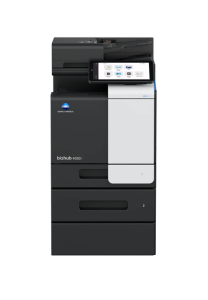
SIMPLE SIMPLIFYING WORK
The User Interface has been completely revamped with an operation panel screen with smart-device-style operability. Operation has been simplified by narrowing down functions and screen transitions to frequently-used functions.
Easy-to-use, new operation panel design
The operation panel features a new simple GUI (Graphical User Interface) design. Features including no hard keys and panel vibration feedback reflect familiar smart devices and enable easy use of a variety of IT services. Simplicity of operation has been achieved by concentrating on frequently-used functions to minimise functions and screen transitions.
GUI operation panel with a choice of two panel styles
The user can switch between two panel styles as required: the new GUI Basic Style characterised by simple operation, and the conventional Classic Style utilising advanced settings and functions. Basic Style also offers an intuitive Simple Copy screen.
|
Home Screen |
The screen is divided into an Information Area and a Main Area which are customisable. |
|
Quick Copy Screen |
The Quick Copy screen easily executes the intended task with minimal screen transitions |

|
System Speed |
Up to 40 ppm |
|
1st page out time A4 |
4.8 sec |
|
Paper input capacity (standard/max) |
600 sheets / 1,600 sheets |
|
Paper tray input (standard) |
1x 500; A6–A4; custom sizes; 60–210 g/m² |
|
Printable paper size |
A6-A4; customized paper sizes |
|
Printable paper weight |
60–210 g/m² |
|
Security |
ISO 15408 HCD-PP Common Criteria; |
|
Scan speed |
Up to 45/45 ipm in simplex (mono/colour) |
|
Scan resolution |
Up to 600 x 600 dpi |
|
System dimension (WxDxH) |
420 x 528 x 572 mm (without options) |
|
System weight |
Approx. 35.0 kg (without options) |
Reviews
There are no reviews yet.